Maths facts, until they’re automatic.
Times tables and division, free. Addition and subtraction with the family unlock. Practised in short, quiet sessions until the answer is just there, with no stopping to count.
For kids about 6 to 11. A way into the harder maths to come that’s easy to start, and treats them as clever young people.
Open the app- Free to start
- No ads
- No tracking
- Works offline
It runs in the browser, on an iPad, a tablet, a computer or a phone. No sign-up to start. Add it to the home screen and it works offline too.
What makes it different

The core
Facts that come without counting
Some things are worth knowing by heart. When 7 × 8 is simply 56, a kid isn’t stuck counting on their fingers halfway through something harder. So the aim is recall: the answer that comes straight away, not the one worked out.
Typed answers, multiple choice and missing numbers, changing from round to round. Only a quick typed answer counts towards gold.

Between rounds
A tidbit, for a breather
After a round comes a tidbit: one short way to see a fact differently, like 12 × 7 as 70 and 14. It’s a pause, a bit of colour, and some depth behind an answer that would otherwise just be memorised.
One idea at a time, then on to the next round.

Six minutes
A session with a clear end
A warm-up and four one-minute rounds, and then it’s done. The goal comes from the kid’s own recent scores, so it’s one they can reach. A miss shows how close it was.
Every session ends with the score, the goal, and the facts that went gold.

Something to collect
Rewards that teach something too
Hitting the goal opens a page of a collection the kid picks: the Seven Summits to start with, then, with the unlock, the Planets, Animal Record-breakers and World Cup Winners. Each page is a few real facts about the world. The reward is more to know, not a prize from a shop.
A page about one summit, planet, animal or team, with a sum to try.
Built on how memory works
Which fact comes next, and when, follows the research on learning facts. In plain words:
- Answering from memory is the practice. Recalling an answer does more than reading it.
- A little on many days does more than a lot at once, so a known fact comes back after growing gaps.
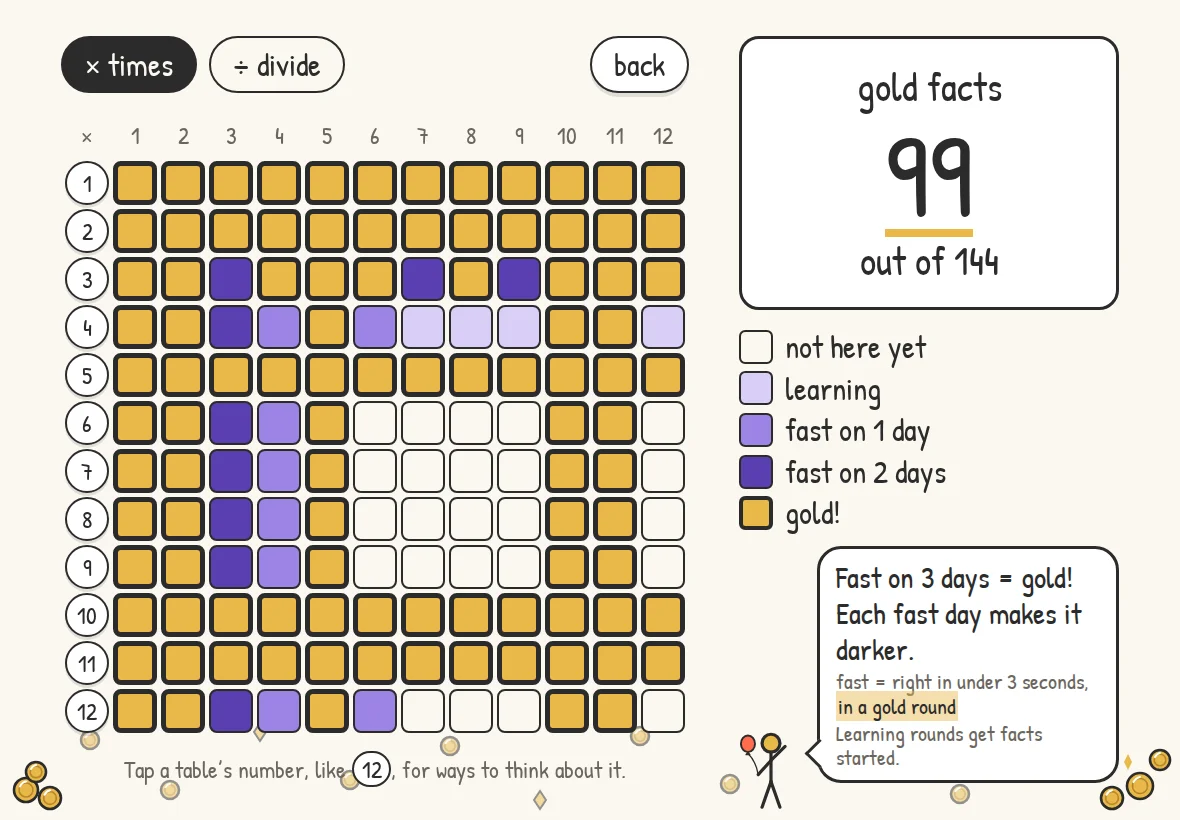
- A fact turns gold only once it’s been fast on three separate days.
- Tables are mixed together, not drilled one at a time.
- Only a few new facts are learnt at once, among mostly familiar ones, aiming for about four right answers in five.
- Facts that look alike, like 6 × 7 and 6 × 8, are kept apart while they’re new.
That’s what the app is built on. It isn’t a promise about any one kid’s results.
Quiet, in how it looks and how it works
Plain screens in pencil and paper colours. No pop-ups, nothing flashing for attention, and nothing for sale in front of a kid. The unlock is bought by a grown-up, on the parent site.
- No ads
- No shop
- No pop-ups
- No subscription
Tracks nothing, keeps almost nothing
No ads, no analytics and no tracking, and nothing it keeps is sold or given to anyone else. What it does keep is short:
- For each kid
- The nickname you give them, their settings and their progress. Not their age, and nothing else about who they are.
- For you
- Your email address, to sign you in, and what you bought, if you buy the unlock.
- For each device
- The name you give it, what kind it is, and when it was linked and last synced.
Nothing about the kids leaves a device until a grown-up starts linking it to the family. The privacy page.
 Alan Skorkin, who made Donkey Maths
Made by a parent in Australia
I have two young kids, and they needed to get fast at their maths facts. Not just right, but automatic: 7 × 8 without stopping to count.
We tried the apps. Plenty were polished, and most were much the same: a shop, and prizes that had nothing to do with the maths. The shine wore off fast, especially for a kid who needs constant novelty, and the practice didn’t stick.
So I made one, the way I wished the others worked. Short sessions that end when they say they will. A format that keeps changing. Goals a kid can actually hit. And rewards that are more learning: a grid slowly turning gold, and a page about a mountain or a planet they chose.
The name is theirs, in a way. When my kids do something silly, I call them donkeys. So it became Donkey Maths.
It was only ever meant for the two of them. They’re the ones who wanted it published, so other kids could use it too. So here it is.
What it costs
Buy once, use it anywhere
One unlock covers the whole family, on every device you link: an iPad, an Android tablet, a computer or a phone. Today that’s the web app on each of them. The same unlock will carry over to the iPad and Android apps when they come.
Free
A$0
for as long as you like
- The 1 to 12 times tables, for one kid on one device
- Division, which is always free
- The gold grid, the goals and the tidbits
- The Seven Summits collection
- This week at a glance on the parent site
The family unlock
A$9.99
once, for the whole family
Everything that’s free, and:
- Addition and subtraction
- Every collection: the Planets, Animal Record-breakers and World Cup Winners
- More kids, and more devices, with sync and backup
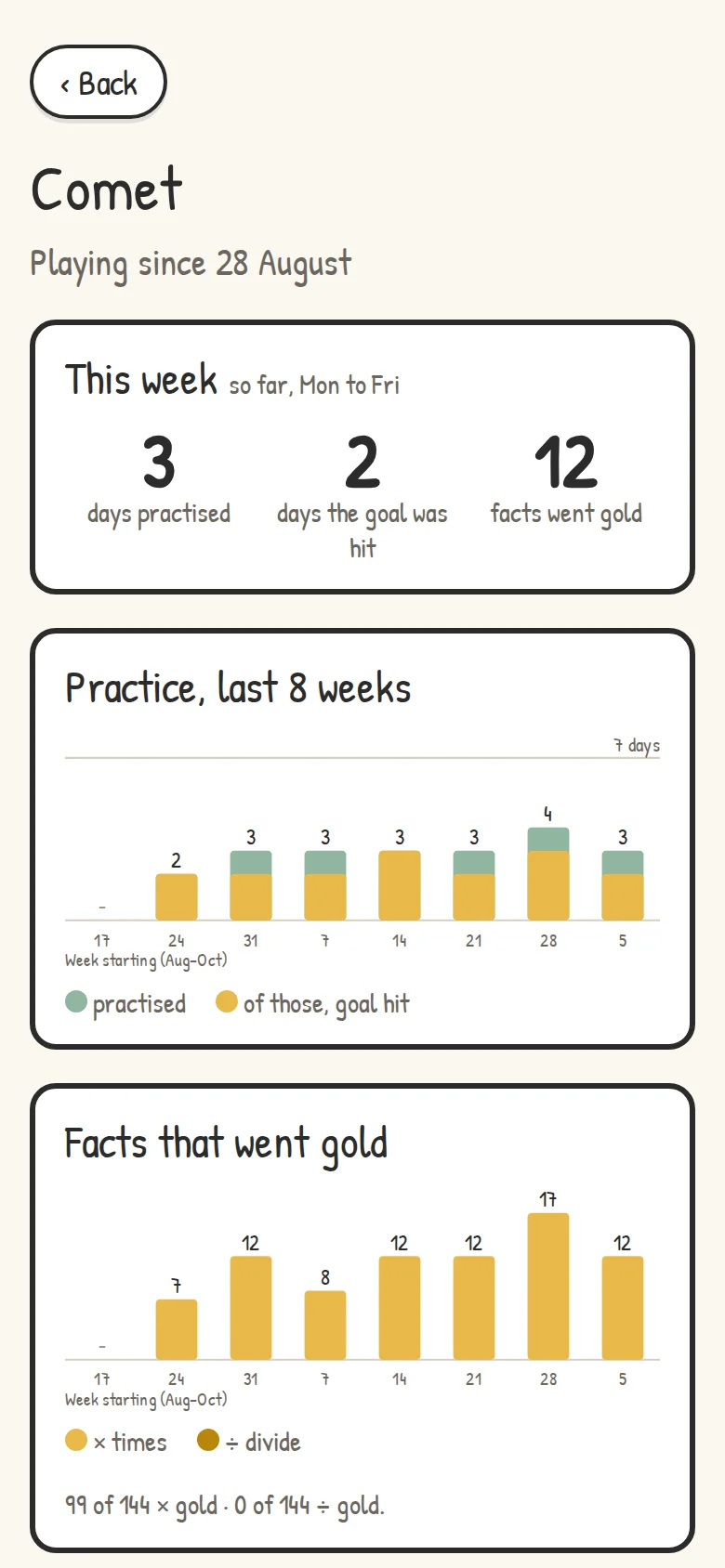
- The full parent view: each kid’s weeks, what went gold and how often they finish
Paid once, not a subscription, and no ads in either. Elsewhere it’s NZ$12.99 in New Zealand, C$10.49 in Canada and US$7.49 everywhere else. The terms.
For grown-ups
The parent site
grown-ups.donkeymaths.com is for you, on your own phone. Sign in with Google or an emailed link.
Linking devices
In the app, tap Grown-ups and it shows a code. Scan it with your phone, and that device joins your family and syncs.
Questions parents ask
What age is it for?
Kids about 6 to 11. In Australia the times tables mostly come in Year 2 to Year 4. The app starts by finding what a kid already knows, so nobody repeats what they’ve got.
Is there a subscription?
No. It’s free to start, and the family unlock is paid once.
Does it work offline?
Yes. Once the app has been opened on a device, it keeps working without a connection. A linked device syncs when it’s back online.